

How to Track Uploads and Troubleshoot Nextcloud for Apple Mail
Track your uploads
Click the app's icon in the menu bar to see your uploads. While files are uploading, the icon is animated.
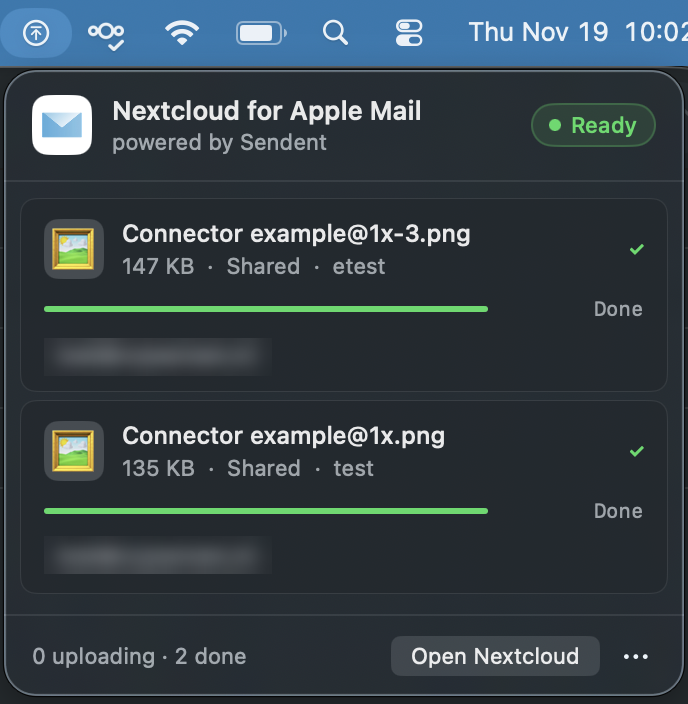
The status at the top shows Ready, Uploading or Disconnected.
Each file shows its size, the email subject, a progress bar and the recipients it is shared with. Recipients who have an account on your Nextcloud are highlighted.
Finished files show Done.
Click Open Nextcloud to open your Nextcloud in the browser.
Click ••• for more options, such as cancelling all uploads, clearing finished uploads and logging out.
You also get a macOS notification when an upload is complete, if notifications are allowed for the app in System Settings > Notifications.
Troubleshooting
Message | Solution |
|---|---|
Not logged in. Open Sendent and log in to your Nextcloud server. | Log in from the menu bar. See How to Install and Set Up Nextcloud for Apple Mail. Then send the files again in a new email. |
Login request timed out. Please try again. | Complete the login in your browser within about a minute after clicking Log in. |
The URL you entered is not valid. Please check and try again. | Enter the full server address, including |
No files found for this email. Try attaching files again before sending. | The app no longer has the files for this email, for example because it was restarted. Add the files again with the Nextcloud button in a new email. |
Insufficient storage on server | Your Nextcloud storage is full. Free up space or ask your administrator for more. |
Files uploaded but sharing failed: … | The files are in your Nextcloud, but could not be shared. Check with your administrator that sharing (and Share by mail, for external recipients) is enabled. You can share the folder manually from Nextcloud. |
For administrators
The app connects to Nextcloud with Login Flow v2 and stores an app password in the user's Keychain.
It does not need the Sendent app for Nextcloud and has no central settings or MDM configuration.
Sharing with external recipients requires Nextcloud's Share by mail app.
The app follows your server's sharing policy: enforced passwords are generated automatically, and the server's default expiration date applies.