

Technical Overview
Concept
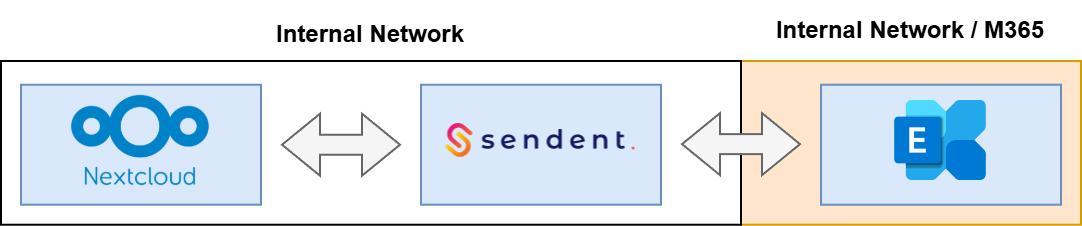
The Nextcloud Exchange Connector is a mediation service that keeps Microsoft Exchange and Nextcloud in sync. It bi-directionally synchronizes a user’s personal calendar and address book. The Nextcloud data is handled via CalDAV and CardDAV protocols, while Microsoft Exchange uses their own interfaces and data formats. The connector continuously converts and relays changes between both sides so updates made in either platform are reflected in the other.
In practice, it runs as a mediation service that keeps Exchange and Nextcloud aligned. On the Exchange side, it communicates via Exchange Web Services (EWS), translating between EWS and Nextcloud’s CalDAV/CardDAV protocols.
Security
Microsoft Exchange access model
For Exchange (both On-Premises and Microsoft 365 Exchange Online), the connector utilizes service accounts. These service accounts authenticate to Exchange and then bind to the user’s mailbox to read and write the data being synchronized (calendar and address book) for that specific mailbox.
Authentication methods
Exchange On-Premises: supports NTLM or Kerberos authentication (LINK).
Microsoft 365 Exchange (Exchange Online): requires OAuth authentication (LINK).
Self-signed certificates are supported
Notice, more details on the installation are available in other articles. This is meant to give an overview.
Nextcloud access model
For Nextcloud, access is granted through a user consent flow (LINK). The user grants access, after which Nextcloud generates a user-bound app-token. This token is securely exchanged to the Nextcloud Exchange Connector, and the connector uses it to access the user’s calendar and address book in Nextcloud via CalDAV/CardDAV.
Network
The Nextcloud Exchange Connector is the only component that initiates network connections. All data flow is outbound from the connector service:
Service → Nextcloud
Service → Exchange
At no point will Nextcloud or Exchange initiate a connection to the service, nor will either platform initiate connections to the other platform. This means you do not need inbound connectivity from Nextcloud/Exchange to the connector—only outbound connectivity from the connector to each system.
The service is deployed and operated in your own environment (self-hosted), so you control where it runs and how it connects.
An air-gapped deployment is supported when you use Exchange On-Premises.
With Microsoft 365 Exchange (Exchange Online) this is not possible, because the connector must reach Microsoft 365 cloud endpoints.
Platform Requirements
Sendent Service
Sendent offers the synchronization service as a container image, which in turn can be deployed using docker, podman or even kubernetes.
The synchronization service requires a database, preferred is PostgreSQL which a default docker-compose file is made available for. It is possible to use a different database technology, please contact for that Sendent support.
The database is used for:Storing encrypted credentials for the Nextcloud user(s).
Storing change-tokens for both Nextcloud and Exchange, for efficient synchronization.
Storing logs.
Nextcloud
Sendent Synchroniser app installed (LINK).
Responsible for offering the consent flow.
Admin settings
License retrieval for the container.
A “Service” admin account. This is used in order to retrieve the encrypted credentials from the persons in the organization who gave synchronization consent.
The Nextcloud user account must have an email address that exactly matches the user’s primary mailbox address in Exchange. This address is used to bind the connector to the correct Exchange mailbox during synchronization.
Exchange
On-Premise
Service Account that may access the user mailbox.
Microsoft 365
Service Account that may access the user mailbox.